
Most business owners treat plugin updates as ordinary upkeep. A WordPress plugin supply chain attack changes that assumption, because the threat can arrive through the same official update channel used to keep a site current.
In this article
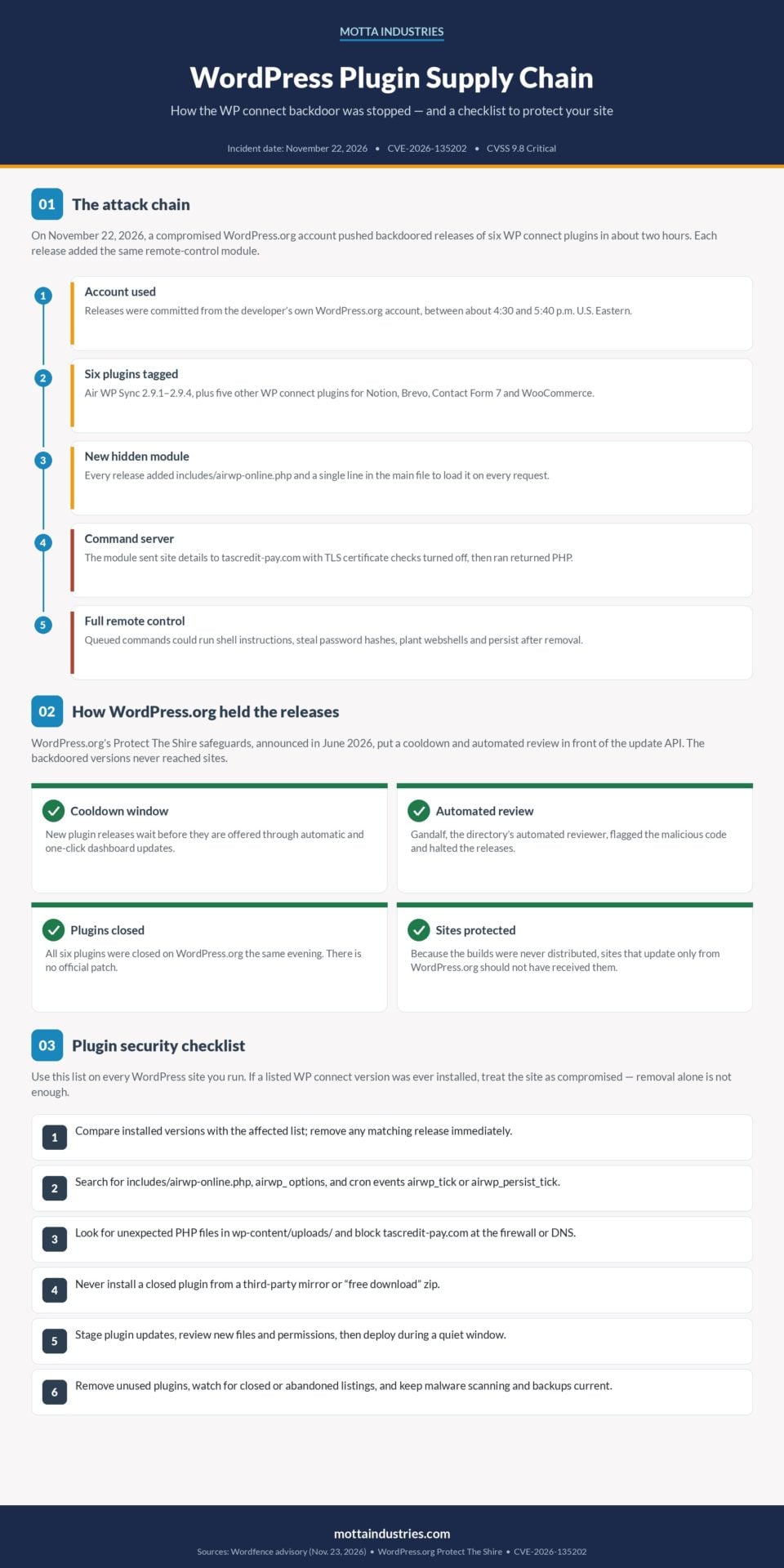
On November 22, 2026, backdoored releases of six WP connect plugins were committed to WordPress.org. The plugins connect WordPress to Airtable, Notion, Brevo, Gravity Forms, Contact Form 7 and WooCommerce. Wordfence estimates the six listings had more than 3,600 active installations.
This was not a typical coding flaw. A remote-control module was added on purpose, and there is no patched version to install. WordPress.org stopped the releases before they reached sites and closed all six plugins the same evening.
Even so, the incident is a useful reminder about WordPress plugin supply chain risk. Official directories are safer than random downloads, but they are not a guarantee. Owners still need an inventory, staged updates, monitoring and a plan for closed plugins.
What a WordPress plugin supply chain attack looks like
In a conventional break-in, an attacker looks for a weak password or an unpatched bug. In a WordPress plugin supply chain attack, the malicious code is inserted earlier, in software you are expected to trust, and then offered as an update.
Wordfence’s analysis describes a consistent pattern. Over roughly two hours on the afternoon of November 22, new versions were committed from the developer’s own WordPress.org account. Air WP Sync received four releases, versions 2.9.1 through 2.9.4, in about half an hour. The other five plugins followed:
- Air WP Sync – Airtable to WordPress (
air-wp-sync): 2.9.1 through 2.9.4 - WP Sync for Notion – Notion to WordPress (
wp-sync-for-notion): 1.7.4 - Add-on Brevo for Gravity Forms (
addon-gravityforms-sendinblue-free): 2.6.3 - Add-On for Contact Form 7 to Airtable (
add-on-cf7-for-airtable): 2.5.4 - Add-On for Contact Form 7 to Notion (
add-on-cf7-for-notion): 1.6.4 - Orders Sync to Airtable for WooCommerce (
orders-sync-to-airtable-for-woocommerce): 1.0.2
Wordfence reports that the release immediately before each of these did not contain the backdoor.
Every affected release added a file at includes/airwp-online.php and a line in the main plugin file to load it. The module ran on every page request through WordPress’s init hook, with a half-hourly scheduled task as a fallback. It sent the site address, software versions and server user to an attacker-controlled domain, tascredit-pay.com, with TLS certificate checking turned off, then executed PHP returned by that server.
Queued commands could run shell instructions, read, write or delete files, dump database tables, steal user password hashes, drop a webshell, and register an hourly task that would keep running attacker code after the plugin was removed.
The issue is tracked as CVE-2026-135202 and rated 9.8 (Critical) on the CVSS scale. In its November 23, 2026 advisory, Wordfence says the pattern strongly suggests the developer’s WordPress.org account was compromised, and that the Plugins Team indicated the developer reports the same.
Why official plugins can still be a target
WordPress.org reviews new plugins before they enter the directory. After that, updates historically went out as soon as a developer published them. That is the opening a WordPress plugin supply chain attacker needs: one compromised account, one bad release, and many sites can be reached at once.
The problem is not unique to WordPress. In Defending Against Software Supply Chain Attacks, CISA and NIST note that these incidents are hard to spot because the software often looks legitimate to the people who install it. The payload arrives through a channel the organization already trusts.
The WordPress developer security documentation makes a related point: plugins and themes are frequent weak points because they run with the power of the site. Do not trust incoming data, and do not assume a component is safe because it arrived from a familiar place.
None of this means you should stop updating. The WordPress plugin supply chain should be managed, not clicked on autopilot, and a plugin’s reputation yesterday is not a substitute for a review today.
How WordPress.org held the WP connect releases
In June 2026, WordPress.org announced Protect The Shire to tighten security for plugins and themes in its directories. The first visible change was a cooldown: each new release would wait before being offered through the update system, so reviewers and an automated checker nicknamed Gandalf had time to inspect it.
On September 9, 2026, the Plugins Team described the next layer: automated security review for plugin releases. Every release is analyzed before it is distributed through the WordPress.org update API, including one-click dashboard updates. The post said the cooldown was then about six hours, and that a high-risk result can block a release automatically.
That design is what stopped this WordPress plugin supply chain incident. Wordfence reports that the backdoored versions were committed between roughly 4:30 p.m. and 5:40 p.m. U.S. Eastern time on November 22. The release delay held them back, and Gandalf separately flagged the code and halted distribution. All six plugins were closed that evening. The backdoored versions were never released to sites.
Wordfence’s monitoring, PRISM, also flagged the module the same evening. The researcher Computeronfire independently reported the backdoor in Air WP Sync.
This is the part of a WordPress plugin supply chain story that is easy to miss if you only read the headline. Sites that update only from WordPress.org should not have received the malicious builds. The remaining work is verification, and a plan for plugins that are now closed.
What to check on your site now
If you use any WP connect plugin, compare the installed version with the list above. If it is older than the backdoored releases, you are not running this backdoor, though you still have a closed plugin to replace. If it matches a listed release, Wordfence’s advice is to remove the plugin immediately, treat the site as compromised, and run a full malware scan.
Look for the file wp-content/plugins/[plugin-folder]/includes/airwp-online.php. In the options table, search for names beginning with airwp_, including airwp_client_id, airwp_api_url, airwp_pending_cmd, airwp_pending_report, airwp_capture_url, airwp_interval and airwp_last_run. In scheduled tasks, look for airwp_tick or airwp_persist_tick, or any unfamiliar hourly hook.
Review outbound traffic to tascredit-pay.com and unexpected PHP files in wp-content/uploads/. Wordfence also noted a user agent beginning AirWP-Sync/ and claiming to be “compatible; like GoogleBot”.
Removing the plugin is not enough if a listed version ever ran, because a WordPress plugin supply chain backdoor of this kind can leave webshells and persistence hooks behind. Rotate administrator passwords, the secret keys in wp-config.php, user passwords and any API keys the plugin stored, and block the command server at the firewall or DNS resolver.
Do not try to “update” a closed plugin from a third-party mirror or a free-download site. The only versions newer than the clean ones are the backdoored builds. A zip from an unofficial source defeats the hold that protected you, and it is a fast way to reintroduce WordPress plugin supply chain malware onto a site that had been spared.
Six proven ways to reduce WordPress plugin supply chain risk
These six practices reduce WordPress plugin supply chain exposure without giving up timely updates.
Keep an inventory and remove what you do not use
Every installed plugin is code that can run on your server. List what is installed, what it does, who maintains it and when it was last updated. Delete unused plugins rather than leaving them inactive. A shorter list is easier to review when the next WordPress plugin supply chain advisory appears.
Test updates on a staging site
Apply updates first on a staging copy, then on the live site during a quiet window. That habit catches broken layouts and gives you a moment to notice a surprising new file or a change you did not expect. For businesses that cannot watch every release, Motta’s website maintenance plans can put that review on a calendar.
Stay on official distribution channels
Install and update plugins from WordPress.org or from a vendor you have a relationship with. Avoid nulled plugins and random zips. If a listing is closed, plan a replacement rather than hunting for a copy elsewhere. Official channels are the ones with review, a cooldown and a public closure, which is the best everyday defense against a WordPress plugin supply chain surprise. The same discipline appears in the plugin handbook’s best practices.
Watch for closed, abandoned or newly sold plugins
A closed plugin receives no official security updates while it remains closed. A sudden change of owner has been the path for earlier malicious takeovers, a risk WordPress.org itself cited when it launched Protect The Shire. When a plugin your business depends on is closed or changes hands, schedule a replacement or a review. That check is a core part of WordPress plugin supply chain hygiene.
Pair updates with monitoring and a firewall
A web application firewall and malware scanning will not stop a trusted plugin from running, but they can flag odd outbound traffic, known malicious patterns and unexpected file changes. Wordfence is developing signatures for this backdoor. Someone should be looking at the alerts. Motta’s security work and web hosting are built around that ongoing watch, not a one-time install.
Treat maintenance as a schedule, not a reaction
The worst time to learn you have twenty forgotten plugins is during an incident. Set a recurring review for core, themes, plugins, users, backups and monitoring. Harden the basics: strong administrator passwords, limited user roles, rotating secret keys, and off-site backups you have actually restored once. The official WordPress hardening guidance is a solid checklist. Do it regularly, so WordPress plugin supply chain questions are answered before they become an emergency.
Together, these habits will not eliminate WordPress plugin supply chain risk. They will make a bad update less likely to land unreviewed on a production site, and they will make a compromise faster to find.
Getting a review and a plan
If you would rather not sort this on your own, Motta Industries can help. Our WordPress development and website maintenance teams can inventory your plugins, check for the indicators above, stage updates and recommend replacements for closed plugins. If you want a security review or a quote for ongoing care, get in touch through our contact page.
A WordPress plugin supply chain incident is unsettling, especially when it involves plugins that looked ordinary the day before. Confirm your versions, retire what you no longer need, and put the next update cycle on a process you trust. If you would like Motta Industries to audit your WordPress site or put managed updates in place, request a quote. We will review the plugin list, the hosting setup and the maintenance schedule, then tell you plainly what should change.
Sources
- Wordfence advisory — November 23, 2026. https://www.wordfence.com/blog/2026/11/supply-chain-compromise-backdoors-six-wp-connect-plugins-blocked-by-wordpress-orgs-release-hold/.
- WordPress.org News (Matt Mullenweg): Protect The Shire — June 5, 2026. https://wordpress.org/news/2026/06/pts/.
- Make WordPress Plugins (David Perez): Automated security review for plugin releases — September 9, 2026. https://make.wordpress.org/plugins/2026/09/09/automated-security-review-for-plugin-releases/.
- CISA and NIST: Defending Against Software Supply Chain Attacks. https://www.cisa.gov/resources-tools/resources/defending-against-software-supply-chain-attacks.
- WordPress Developer Resources: Security. https://developer.wordpress.org/apis/security/.
- WordPress Plugin Handbook: Best Practices. https://developer.wordpress.org/plugins/plugin-basics/best-practices/.
- WordPress Developer Resources: Hardening WordPress. https://developer.wordpress.org/advanced-administration/security/hardening/.
- CVE Record: CVE-2026-135202. https://www.cve.org/CVERecord?id=CVE-2026-135202.